A familiar language
Variables, loops, functions and strings. Grow to classes, interfaces, inheritance, collections and arrays.
Explore the language → TT BASICSTUDIO
VERSION 0.12 / ATARI TT
Build your next Atari app in BASIC. Design GEM forms, write object-oriented code and debug on the TT itself.
Studio + runtime + examples + source code. All in one ZIP.
01 / FROM IDEA TO APP
An editor, designer and debugger in one GEM environment. No modern computer needed to write and run BASIC programs.
Variables, loops, functions and strings. Grow to classes, interfaces, inheritance, collections and arrays.
Explore the language →Place and move controls, adjust properties and switch between form and code with Ctrl+D. The designer supports a maximum of 16 controls per form.
View the designer →Set breakpoints, step through methods, view variables and track the call stack. Catch errors with Try / Catch and Throw.
View error handling →Export your project with Ctrl+E. The program bundles the interpreter and required BASIC resources and runs independently, without Studio.
This is how exporting works →02 / YOUR INTERFACE, VISUAL
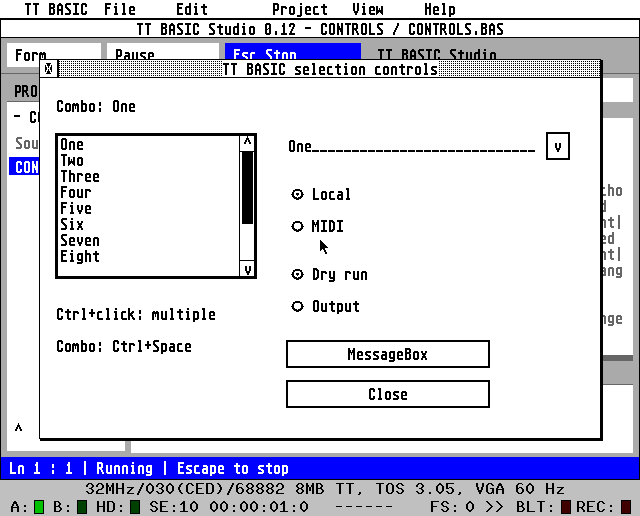
Window, Button, Label and TextBox. CheckBox and RadioButton. A ListBox with multiple selection and a ComboBox in which you can also type yourself.
Link events to your own procedures. Use MessageBox for a question, notification or confirmation.
Discover the GUI controls ↗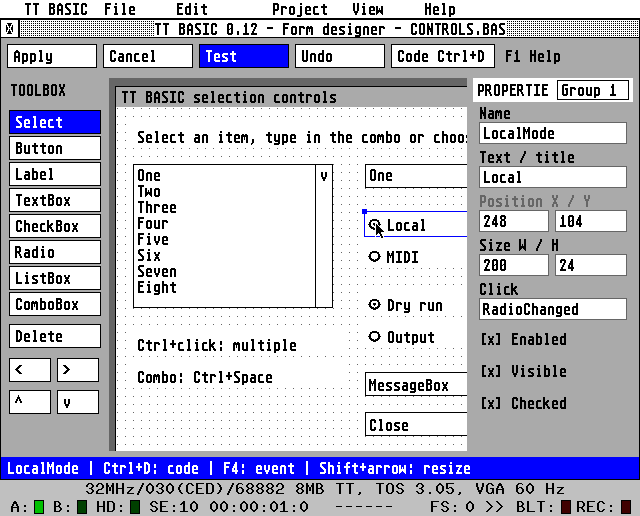
03 / START SMALL
Open MAIN.BAS in Studio and press Ctrl+R. The output appears below the editor. The same source works in the Dutch, English and German interface.
More examples →Print "Hello Atari TT!"
Dim answer As Integer = 6 * 7
Print answer
End04 / MORE TO DISCOVER
Send notes, controllers and program changes via MIDI output. Try the dry run first and look at the DX7 example.
MIDI code →Use multiple source files, Imports and .TBP projects. The project tree keeps your files together; code completion helps while typing.
The complete C source code and build instructions are included in the package. Use the ready-made programs or build your own with Pure C.
View the package →GOOD TO KNOW
TT BASIC was developed for the Atari TT with GEM and minimum 640 × 480. Version 0.12 was tested in Hatari with TOS 3.05, TT Medium and 8 MiB ST-RAM. Validation at a physical TT is still open.
The .PRG is standalone, with a built-in interpreter and project resources. BASIC does not compile to 68030 machine code. On the target machine, Studio, Pure C and separate .BAS files are not needed.
No. TT BASIC has its own limited BASIC language. There is no BASIC file I/O, no multidimensional arrays, and no Finally yet, among other things. Check the language reference and manuals for current limits.
HELP TT BASIC GROW FURTHER
TT BASIC is free software, created out of fun in BASIC and the Atari TT. With a voluntary contribution you support the further development of the language, Studio, documentation and examples.
Downloading and using remains free. Every contribution is welcome.
Donate voluntarily · opens Buy Me a Coffee in a new tab.
YOUR NEXT PROJECT STARTS HERE
Free software. Source code included.